Christmas PFP
Framing
Christmas PFP Circle Crop Guide for Hats and Ears
Keep Santa hat pompoms, pet ears and antler tips inside a circle crop. Compare three diagrams, check your preview and keep a square master image.
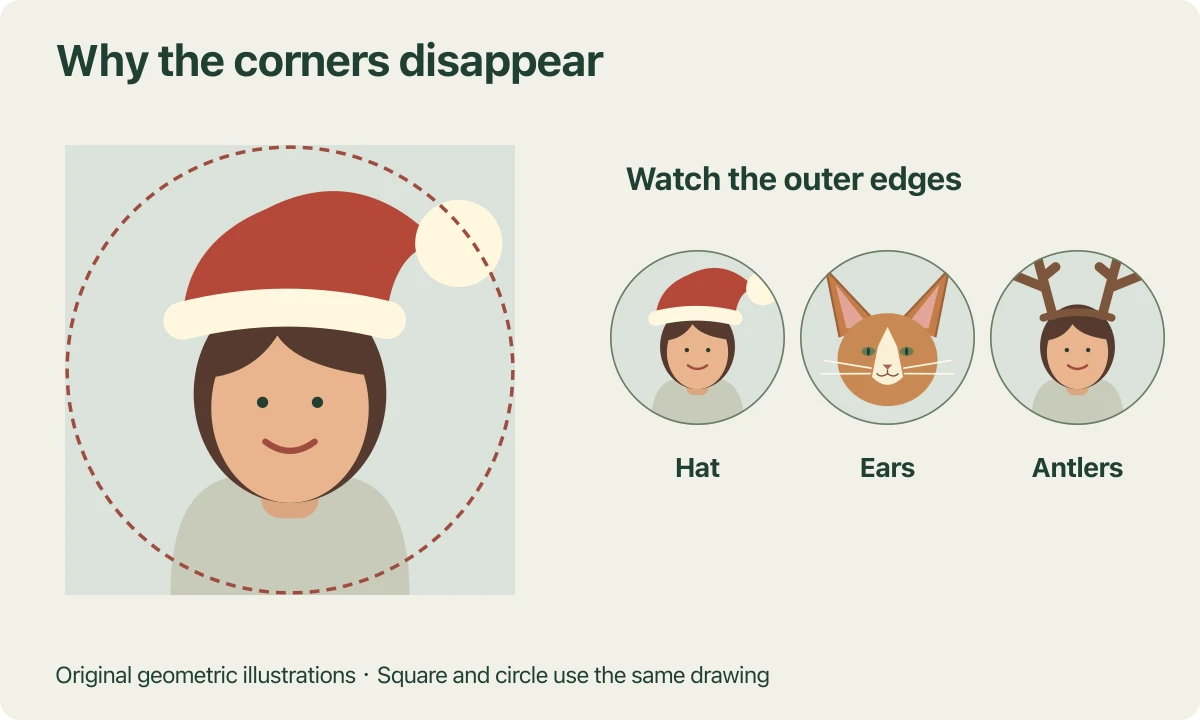
A Santa hat can fit neatly inside a square photo and still lose its pompom when you use it as a profile picture. The same thing happens to cat ears and reindeer antlers. Before making another image, compare the square and circle views of the one you already have.
The drawings in this guide make that difference visible. Each pair uses the same original square illustration, at the same scale and position. Only the circular mask changes. These are geometric examples prepared for the article, with deliberately awkward accessory placement to show where clipping happens.
See which parts of the square a circle hides
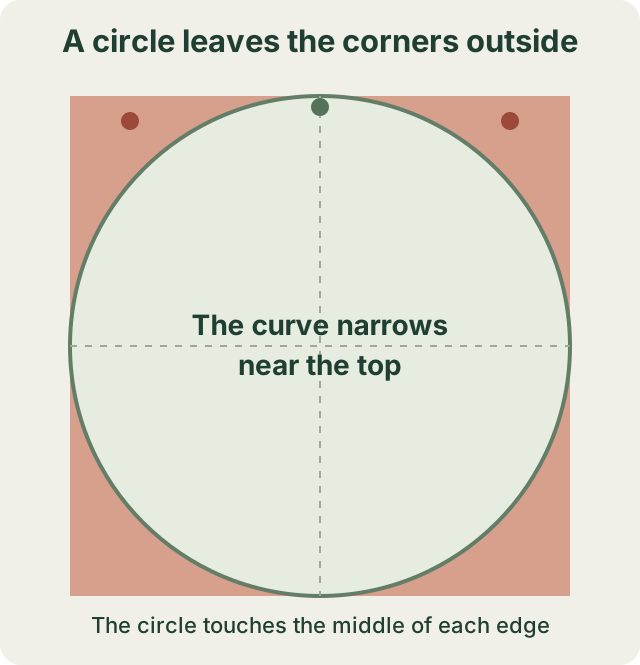
The shaded corners lie outside the circle. The top centre and the upper corners have different amounts of usable space.
A circle drawn inside a square touches the middle of each edge. It does not reach the four corners. Near the top of the image, there is therefore much less horizontal room than there is across the middle. Moving an accessory toward an upper corner can hide it even when it stays inside every straight edge.
This is why a single instruction such as leaving space above the head can be incomplete. A pompom needs room to the side, while two upright ears need room on both sides at once. Follow the curve around the detail you want to keep.
There is no universal avatar safe area percentage that guarantees every face, hairstyle and accessory will fit. Start with the actual outline in your picture. A tall headpiece and a wide pair of ears create different framing problems.
Find the pompom before judging the face size
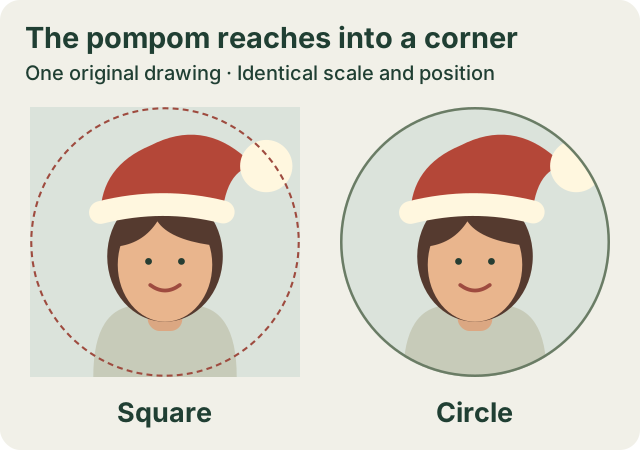
The drawing stays fixed between views. Part of the pompom sits outside the circle.
In the hat drawing, the face remains easy to recognize in both views. The pompom extends toward the upper right corner, where the circle narrows. Looking only at the face would miss the lost part of the accessory.
Trace the brim, the folded cap and the whole pompom in your own result. When the destination app offers position or zoom controls, try a small adjustment and check the opposite side of the head again. Moving one detail inward can push another outward. The Santa hat photo guide helps with the earlier choice of source photo and hat treatment.
Check both ear tips independently
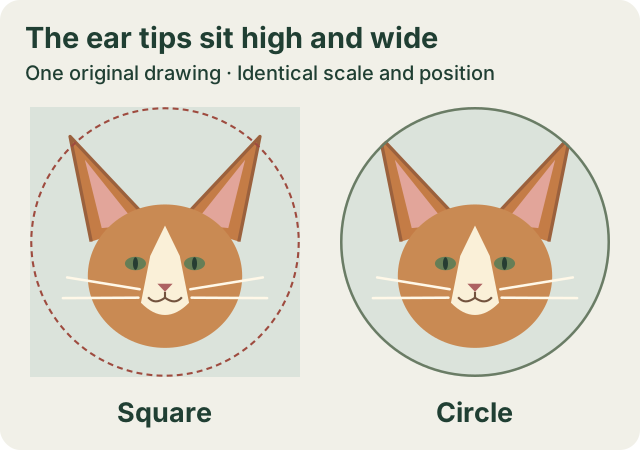
Both ears fit inside the square. The circular boundary crosses their outer tips.
The cat drawing places two ears high and wide in the frame. A centred nose gives little information about whether those ears fit. Inspect one ear from its base to its tip, then follow the other ear separately.
Whiskers need a different check. Their longest strands can approach the sides of the circle while the ears approach the top. You may prefer a slightly smaller head if that lets you keep the outline you recognize. Compare the expression at thumbnail size before settling on the crop.
The Christmas cat PFP guide explains how to compare ears, muzzle and markings with the source. Those identity checks still matter when the circle itself looks tidy.
Dog ears can use more of the sides or more of the height. The dog ear-shape guide compares two source-photo studies before the circle check.
Follow the outer branches of the antlers
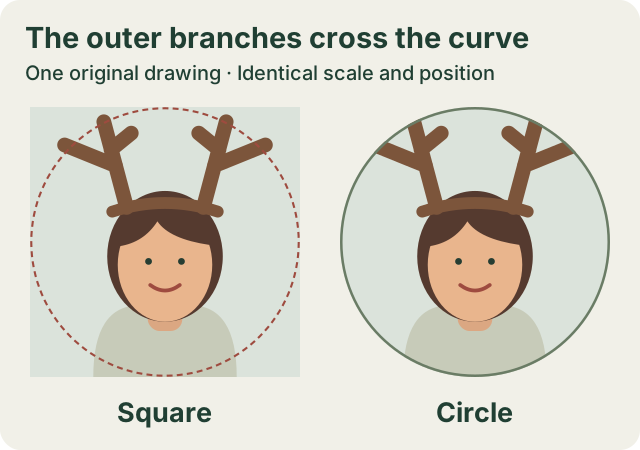
The highest point is only one part of the check. Side branches can cross the curved boundary too.
In the antler drawing, the tips spread outward above the head. A gap directly over the forehead does not protect those outer branches. Follow each branch to its end rather than judging the headpiece by its centre alone.
A softer, shorter accessory may give you more room, but inspect the finished outline. The reindeer antlers photo guide shows where to check the headband against hair or pet ears. Keep this crop check for the next step, after you are happy with the accessory itself.
Compare the studio preview with the final app
In the Christmas PFP studio, Square shows the full image and Circle shows a round view. You can download a square PNG or a circle PNG with transparent corners. Choosing a different download shape does not use additional generation credits.
The app where you set your profile picture controls its final display. Inspect its upload preview, then look at your profile and a small everyday view such as a chat message. A large profile preview can make details look clearer than they do beside a short line of text.
For Discord, use the Christmas PFP upload guide for the profile settings and the smaller chat view. Keep the crop check tied to what you can see in your own account instead of treating the drawings here as platform specifications.
For TikTok, the static photo upload guide follows the official profile-photo instructions and keeps the crop check tied to the picture you actually save.
Keep a square master and repair the framing early
Save the full square image before committing to one circular version. It gives you the original edges to work with if you later try another app or change the framing. A circle PNG has transparent corners, so those corners cannot supply picture detail after a later repositioning.
If an ear or pompom is already missing from the square image, changing the mask cannot recover it. Choose a source with more surrounding background or prepare a looser frame before making another picture. Zooming out can reveal only the image area that exists in the file.
Check the whole accessory in the round preview, then check whether the face is still clear at a small size. The simple Christmas PFP guide gives you 48 and 96 pixel examples for that second check. The complete Christmas PFP tutorial covers upload and download steps when you are ready to make a new version.
Open the studio with a photo whose full head and accessory have room to fit.
The hand-drawn Christmas guide compares a portrait at two small circle sizes. For a photographic hat, the sticker and AI method guide explains what each edit changes before cropping.
For Facebook, the Christmas profile photo update guide connects this crop check with its documented upload route, public visibility and keeping your everyday photo.
For WhatsApp, the Christmas DP photo and privacy guide connects the round preview with its documented Web upload route and profile-photo audience controls.
If the framing is correct but the file looks soft, use the blurry profile picture diagnosis to compare the saved download, a screenshot and an enlarged copy.