Christmas PFP
Composition
Simple Christmas PFP Ideas That Stay Clear at Small Sizes
Make a simple Christmas PFP with one festive detail, clear contrast and space around the face. Compare three layouts at 48 and 96 pixels.
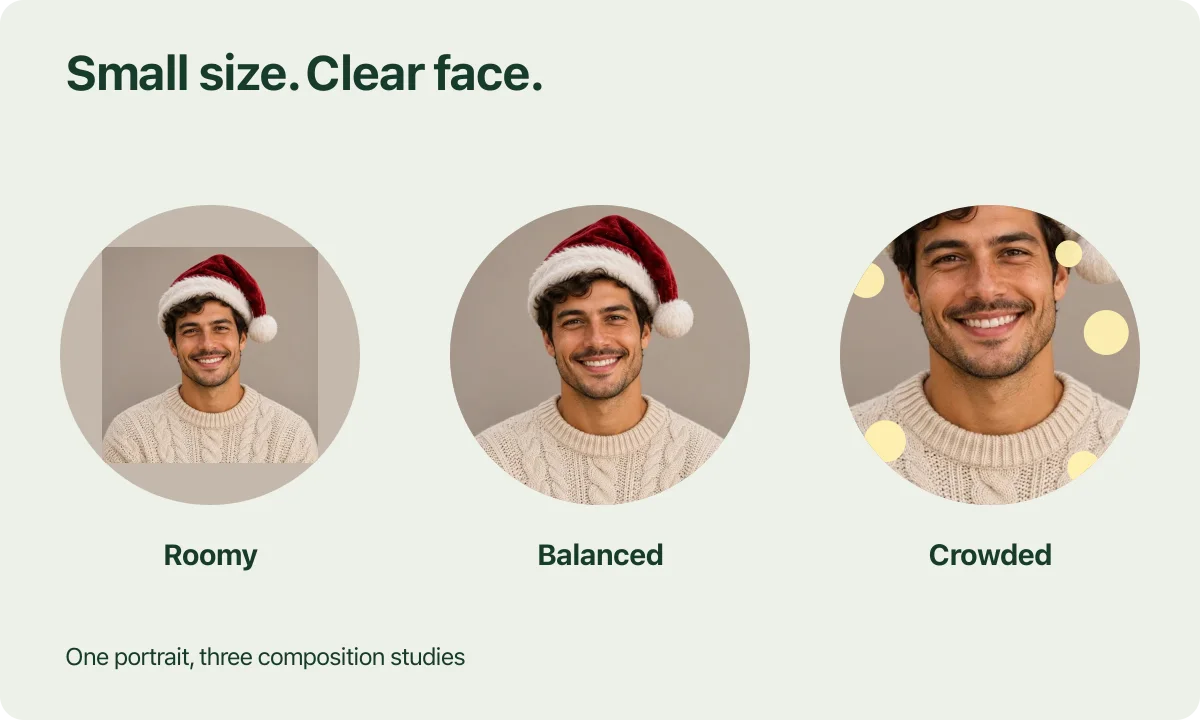
A red Santa hat can be enough for a simple Christmas PFP. The useful question is whether people can still recognize the face when the picture sits beside a short message. A large preview can make almost any festive portrait look more detailed than its everyday avatar view.
For this guide, we arranged one fictional AI-created portrait into three deliberately different compositions. These are layout illustrations, including the extra bright dots in the crowded version. They do not show three website generations or a test of the tool's ability to remove decorations.
Choose one festive detail first
Start with a photo you already use or would comfortably use as a profile picture. A familiar expression gives friends something to recognize after you add a seasonal detail. The hat can provide the Christmas connection while the face continues to do most of the work.
Santa hat only is a useful starting preset for a subtle Christmas PFP. It aims to add the accessory while keeping the original setting and clothing. You can inspect a restrained change without first deciding whether you want an entirely new scene. AI can still alter details, so compare the result with the original.
For a minimalist Christmas profile picture, look at the source around the face before uploading. A bright sign, a patterned curtain or an object near the hairline may already compete for attention. Choose another source photo when that competition bothers you. The studio has fixed presets and does not provide a tool for selecting and deleting arbitrary objects.
If you are still deciding how much change you want, the nine-style Christmas PFP guide separates simple accessories from a new scene or illustrated treatment.
Give the face enough space in the frame

Layout study using one AI-created portrait. Margins, crops and illustrated light dots were arranged for this article.
The roomy example keeps plenty of space around the subject. The entire hat is comfortable inside the frame, but the face occupies less of the small picture. At a large viewing size that may feel relaxed. At a small size, the eyes and expression become harder to pick out.
The balanced example gives more space to the face while leaving room above the hat and beside the pompom. Start by comparing that framing with your own source. Notice the smile and the separation between the dark hair and the white hat trim, then check the space each accessory needs.
The crowded example combines a closer crop with illustrated bright dots. Parts of the hat have less room, and the dots introduce more things to notice. The example changes both framing and decoration, so it does not isolate the effect of brightness alone.
These are visual comparisons, with no universal head-size percentage attached. Hair, glasses, a hat's shape and the direction of the face all affect the space a particular picture needs.
Compare the same layouts at 96 and 48 pixels
| Layout | 96 px | 48 px |
|---|---|---|
| Roomy |  |  |
| Balanced |  |  |
| Crowded |  |  |
View the table at normal browser zoom. The samples use 96 and 48 CSS pixels as this article's comparison conditions. They are not official requirements for Discord or any other platform. Your browser zoom and screen can affect how the examples appear.
Notice what survives in the smaller column. In the balanced version, the red hat and face remain the obvious subjects. The roomy face becomes smaller, while the crowded version gives more of its limited area to competing details. Fine fabric texture matters less in this view than the outline of the face and hat.
Make the same comparison with your own result. Open two options at equal sizes so you can judge the framing fairly. Check the expression first, then whether the whole accessory fits. If you use Discord, the Christmas avatar guide explains where to inspect the saved picture in your profile and chat view.
Keep bright details away from the face
Warm lights can be part of a clean Christmas avatar when they leave the face distinct. Look at their position and contrast. A bright spot directly beside an eye may demand more attention than several soft lights farther away.
The same check applies to a very pale hat trim against a very pale background. Look at the boundary at thumbnail size. If the shapes become difficult to separate, another source or a different available preset may suit your picture better. Avoid adding tiny holiday text to solve the problem. It gives the thumbnail another small detail to carry.
After generation, inspect familiar features as carefully as the composition. Check glasses, the hairline and the expression against the source. A tidy frame does not establish that the face is accurate.
Save the version that works in your account
Sign in and confirm the selected style before generating. Each picture uses 5 credits; a failed attempt returns those credits. Another successful option uses another 5 credits. The one-time pack is $5.99 for 100 credits, before applicable tax, so it helps to settle the source photo and framing first.
Keep a square PNG with the whole image. You can also choose a circular PNG download with transparent corners in the current studio. Check the final file in the app where you will use it, since its own avatar preview is the last place to judge the crop.
For the full upload and download steps, use the Christmas PFP tutorial.
For hat or ear tips close to an edge, the circle crop guide shows which corners a round view hides.
Try Santa hat only with a photo that already gives your face room.
Choosing a different setting? The Christmas PFP backgrounds guide compares how warm tree lights and pale snow change the contrast around the same portrait.