Christmas PFP
Cartoon
Turn Your Photo into an Original Christmas Cartoon PFP
Make an original Christmas cartoon PFP from your photo. Compare hair, expression and illustrated details, then check the result at small avatar sizes.
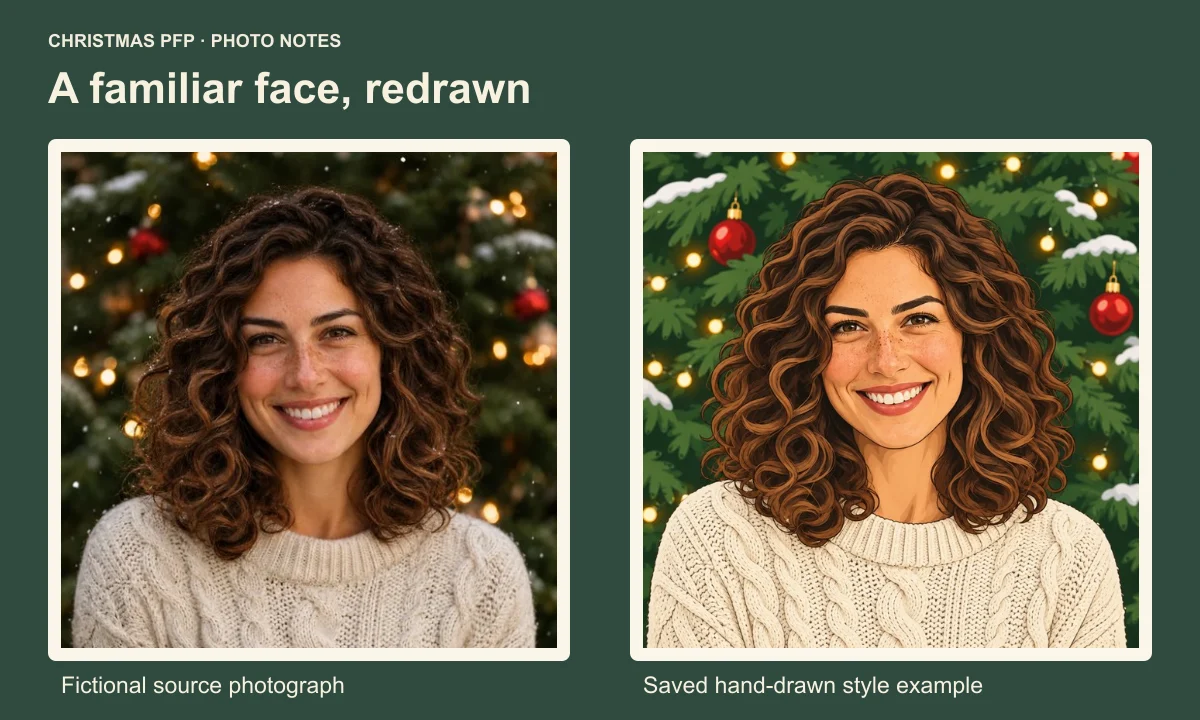
Start your Christmas cartoon PFP with a photo whose expression you like. Choose the hand-drawn treatment, then put the drawing beside that photo. Look for the face and hair you recognize before you decide whether to use it as your avatar.
The comparison in this guide uses one fictional source portrait and its saved Hand-drawn Christmas example. The output was generated on November 13, 2026, using the application's style prompt. We can examine its particular changes; another selfie can produce a different result.
Pick the features you want to carry into the drawing
Look at your source before browsing more effects. Find the part of your hair, the outline around your cheeks and the expression you would want friends to recognize. If you wear glasses, include the frame shape in that check. Keep the original nearby so you can make a direct comparison later.
Our source has a broad smile and a large outline of brown curls. A cream sweater separates the shoulders from the dark green background. Those features give the illustrated version something visible to retain even as skin texture, strands and tree branches become drawing marks.
A photo with an unobstructed face makes that comparison easier. If a hand covers your mouth, or hair hides an eye, the result still needs checking against an unclear part of the source. Another photo can give you a clearer reference without asking the drawing to supply the missing detail.
Choose the hand-drawn look deliberately
In Christmas PFP, choose Just me, then Creative characters and Hand-drawn Christmas. The cartoon style link selects this look. Check the active name before generating, especially if you have been browsing other options.
Hand-drawn Christmas changes the visual treatment of the portrait. The saved example replaces photographic hair and foliage with outlined shapes and painted areas. A Santa hat accessory makes a different choice about how much of the photograph to redraw. The style ideas guide helps when you are still choosing between those directions.
This preset makes a static original Christmas cartoon avatar from a source photo. There is no character-template selector or animation step in this workflow.
Read the result beside the source
The two pictures share a curly silhouette, a smile and a cream knit sweater. The illustration gives the eyebrows stronger edges. Individual curls become more definite dark strokes, and the tree becomes larger painted foliage shapes. The expression remains cheerful, although the mouth and teeth have been redrawn.
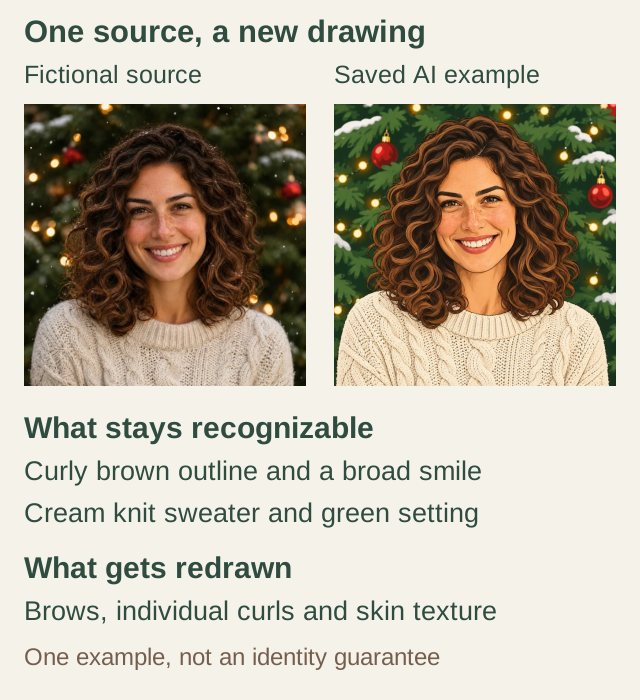
The same fictional source and a saved AI style example. The curls, sweater and smile remain recognizable here, while individual marks are redrawn.
Look at those changes separately. A familiar hair outline can remain recognizable while the eye shape or mouth changes more than you want. Look at the eyes and mouth before accepting a familiar color palette.
The freckles in this example appear as drawn marks. They are useful to notice, but a generated drawing cannot serve as a record of their precise position. Use your own source when judging whether a particular detail matters to recognition.
Check glasses and hair before adding more decoration
For a selfie with glasses, compare the two rims, the bridge and the way the frames meet the face. Look at each eye through the lenses. A pleasing overall illustration can still contain a frame shape you would never wear.
For hair, follow the part and the outside silhouette first. Then check curls, a fringe or the length beside the cheeks. In the saved example, the dark curl outlines carry much of the drawing's character. You may prefer gentler marks if you want a quieter avatar.
Give facial proportions their own pass. Compare the width around the cheeks and the lower edge of the jaw at the same displayed size. Accept changes that suit your intended cartoon, and keep looking if the expression feels unfamiliar. Choose the amount of stylization you are comfortable showing beside your name.
See which details survive a small circle
A full-size cartoon has room for sweater stitches and painted highlights. A small avatar gives those details less space. Compare the source and drawing at equal sizes so a larger face does not win simply because it is displayed larger.
| Image | 96 px | 48 px |
|---|---|---|
| Source |  |  |
| Drawing |  |  |
The samples here use 96 and 48 CSS pixels at normal browser zoom. These are comparison sizes for this article, not upload requirements from any platform. In the smaller drawing, the broad hair outline and smile remain easier to pick out than individual sweater stitches.
Check the round boundary as well. Curly hair spreads beside the cheeks, and those outer curls can disappear when a square becomes a circle. The circle crop guide explains that geometry. Keeping more of the square cannot restore an important detail that was already cut from the generated picture.
Save a version you can actually use
Download the square PNG as your master and keep the source photograph. The studio also provides a circle PNG with transparent corners. Review the saved file itself, then check the destination app's final crop before replacing your account picture.
Generating a person or pet image costs 5 credits. Browsing styles and adjusting the download crop use no extra generation. A new attempt is another generation, so keep the useful version before deciding to try again.
If you mainly want your photographic face with a seasonal accessory, the sticker and AI method guide explains that choice. If the illustrated treatment is the part you want, make a hand-drawn Christmas PFP and compare its expression with your source before you save it.