Christmas PFP
Photo review
AI Profile Picture Changed Your Face? What to Check First
Compare an AI Christmas portrait with its source. Check the smile, face shape, hairline and distinctive details before deciding whether to keep or retry it.

If an AI profile picture changed your face, put the source photo beside the saved result before generating again. Check which detail feels different. A changed smile calls for a different decision from a deliberately simplified cartoon, and a larger output file does not prove that the face stayed faithful.
For this guide, we inspected a saved Santa hat edit made on November 13, 2026, using the application's editing prompt and a fictional source portrait. The broad smile remains familiar, but the curl arrangement and visible freckle pattern change. This single example shows why a face comparison is useful. It cannot establish a success rate for other people or styles.
Make sure you are viewing your own result
Style cards show examples of a look. They do not show how your uploaded face will turn out. Check that you have opened the completed picture from your generation before comparing it with your original.
Keep the source file and downloaded result in the same folder while reviewing them. If you made several versions, give each a useful filename so you can tell which style produced which image. Comparing the wrong source with a later result can make a change seem more mysterious than it is.
If you have not completed a generation yet, the Christmas PFP walkthrough explains the upload, style and result steps. Begin the identity check when you have an actual result to save.
Compare the whole expression before small details
Start with the mouth and eyes at a comfortable display size. Does the smile still have the same general shape? Is the gaze pointing in the same direction? You do not need an automated similarity score to decide that an expression feels unlike you.
Next, compare the outline of the face. Look at the cheeks and chin, taking account of different head sizes in the two files. Avoid treating a tighter crop as evidence that the jaw itself changed. Resize the viewing windows until the faces occupy roughly equal space, then look again.
The source in our saved example is 512 pixels square, and the output is 1024 pixels square. The comparison below displays them at equal widths. It does not align every landmark or measure biometric similarity. Its purpose is to make specific visible differences easier to discuss.
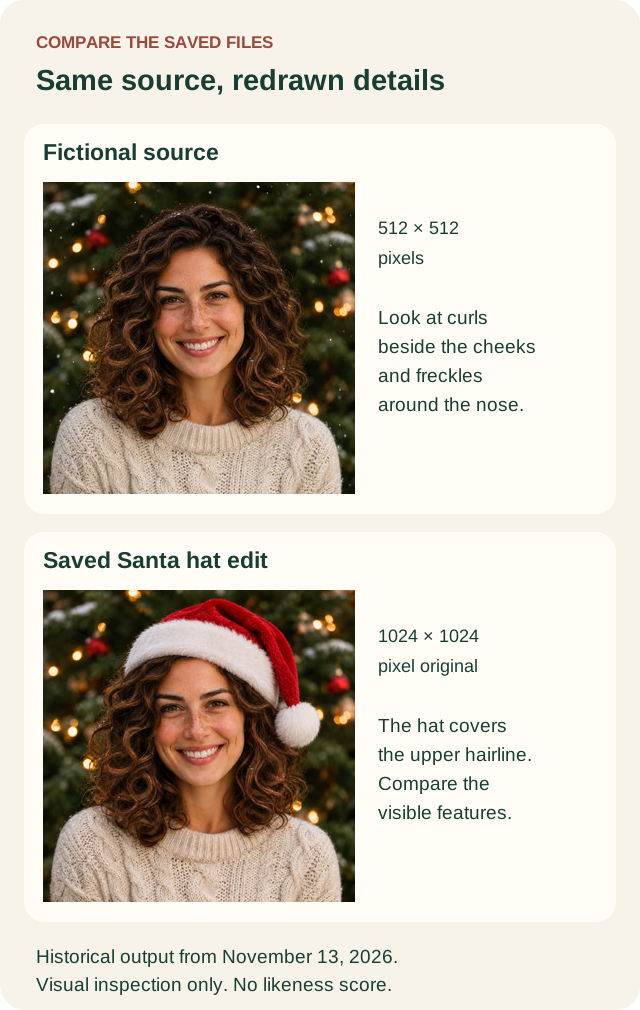
Fictional source and saved application output from November 13, 2026. Original dimensions are 512 pixels square and 1024 pixels square respectively. The reduced diagram copies support visual review, without a measured likeness score.
Notice changes an accessory can hide
In this example, the Santa hat covers the upper hairline that was visible in the original. The curls beside the cheeks also have a different arrangement. Freckles remain part of the generated portrait, but their exact pattern is not copied point for point.
The saved edit keeps the overall curly-haired portrait and a broad smile. You may find that resemblance sufficient for a seasonal avatar, or you may want a closer match. Decide from the features you care about, with the source still beside the result.
A hat can create an additional problem when it covers the very feature you use to judge the result. Check the visible hairline before considering the accessory's texture. The Santa hat photo guide shows how source framing leaves room around the head.
Use a short identity worksheet
Copy these prompts into a note and write keep, reject or check again beside each one. Record the specific difference, such as “the left side of the smile has changed,” so another attempt has a clear purpose.
| Feature | What to compare with the source |
|---|---|
| Expression | Eye direction, mouth shape and the amount of visible teeth |
| Face outline | Cheek width and chin shape at a similar display size |
| Hair | Parting, broad silhouette and the visible hairline |
| Everyday details | Glasses shape, facial hair and features you recognize |
| Distinctive marks | Freckles, moles or other details that matter to you |
| Selected style | Whether a change follows the requested material or appears unintended |
This is an acceptance aid, not a facial recognition test. You can reject the image for one personally important difference even if the other rows look acceptable. Keep the original private while you make the comparison.
Allow for deliberate illustration changes
Hand-drawn Christmas simplifies features into drawn shapes. Felt toy uses toy geometry and bead-like eyes; Gingerbread character uses icing details. Realistic pores or the exact spacing of freckles are not a useful expectation for those material styles.
You can still inspect the hair outline, glasses and expression within the chosen treatment. Our photo-to-cartoon guide shows that kind of comparison. If you want a photographic face with one accessory, choose a photographic edit before deciding that a simplified style changed too much.
Glasses deserve their own check when reflections hide the eyes or the frame shape changes. The glasses and glare guide covers that narrower problem. File softness belongs to a separate blurry avatar diagnosis.
Decide whether another attempt is worth it
Replace the source first if the face is hidden, very small or already unclear. A different source can give the edit better visible information, but it does not guarantee an exact likeness. Keep an unedited photo as an available choice.
When the source is clear, decide whether another style better suits the amount of change you want. If repeated results keep losing an important feature, stop and use the original or a manually placed accessory. There is no requirement to keep generating until a result becomes acceptable.
A new person or pet generation uses 5 credits. A confirmed technical failure returns the credits charged for that attempt; requesting a different completed version is a new generation. If you choose to try the studio again, keep the rejected result and your note so you can check the exact feature that prompted the retry.