Christmas PFP
Couples
Matching Christmas PFPs for Couples (Two Photos)
Make matching Christmas profile pictures from two separate photos. Coordinate style, framing and color, check both faces, and understand the credit cost.
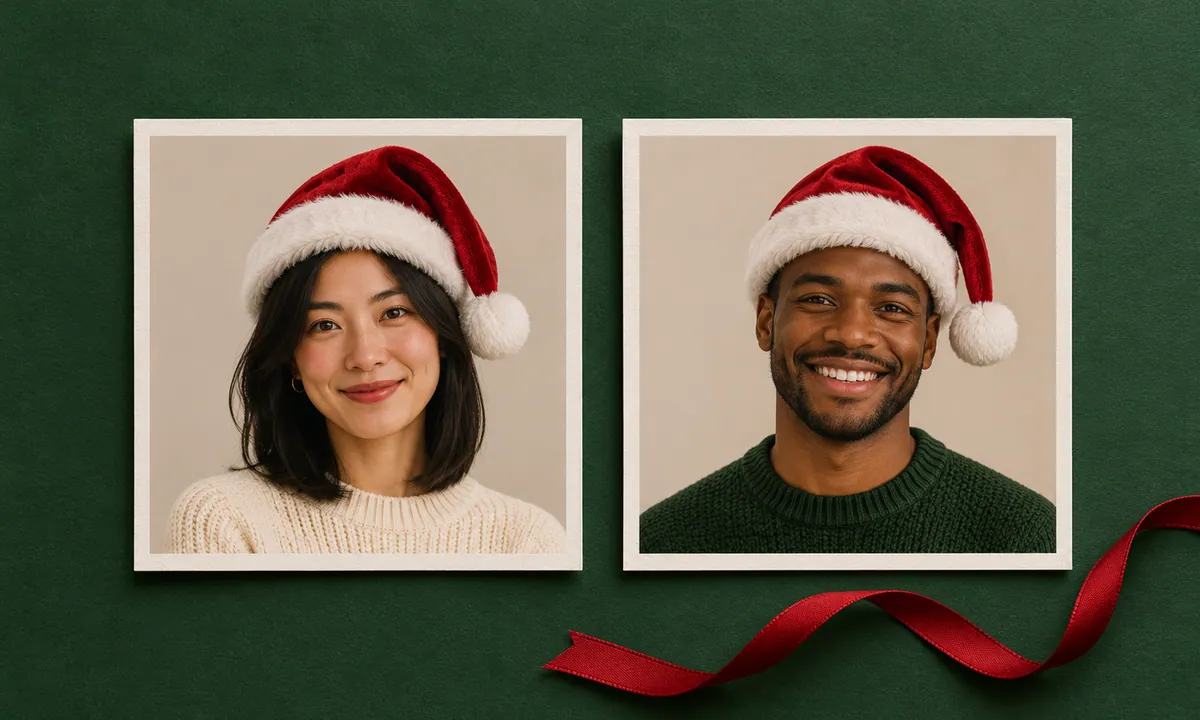
Two red Santa hats can make a pair of portraits feel connected. For matching Christmas PFPs for couples, start there, then compare how much space each face takes up. Similar framing and compatible colors help the pictures belong together while leaving each person recognizable.
This workflow starts with two separate photos and produces two separate avatars. In Person mode, each person has their own generation. It has no automatic two-photo matching template or tool for making a split picture that joins across two accounts.
For one photo of you together, use the Christmas group photo editor instead. Upload an existing couple photo, choose an outfit and keep the complete horizontal or vertical composition. That produces one complete photo for 10 credits.
The examples below use fictional AI-created portraits to show a coordinated look and a deliberate framing mismatch. They are design illustrations.
Pick two photos with similar angles
Put the source photos next to each other before uploading. A front-facing head-and-shoulders portrait is an easy starting point for both people. If one photo fills the frame with a face and the other includes someone's whole upper body, try a closer crop of the second photo first.
Compare the direction of the light as well. Two softly lit faces give the pair a consistent starting point. A strong shadow across one face may be part of a photo you like, but it will create a different mood beside a bright, evenly lit portrait. Decide whether that difference suits the pair before generating anything.
Leave space above the hair for the hat, and keep the eyes clear. Use the studio’s drag, zoom and position controls to adjust each source. After generation, you can adjust the downloaded framing again and compare square and circle previews without spending extra credits.
Choose photos each person is comfortable using as a profile picture. You can coordinate the framing without requiring the same expression, hairstyle or clothes.
Agree on one Christmas avatar style
Use the same preset for the two generations. Santa hat only is a straightforward choice for photo-based Christmas couple profile pictures, especially if you both like your original backgrounds. It aims to add the hat while retaining the existing setting.
Warm Christmas tree creates a warmer indoor scene, while Blue snowy woodland uses a cooler winter setting. Choose between those palettes together. Two independent generations can still vary in background detail and lighting, even when you select the same preset.
For matching holiday avatars with an illustrated look, you can both choose Hand-drawn Christmas. The nine-style inspiration guide compares the available looks. There is no anime character picker or custom prompt box, so plan around the styles actually shown in the studio.
Compare the pair at the same display size

Design example · Separate portraits coordinated through a shared red and cream palette and similar head sizes.
In this coordinated example, the two portraits have comparable head sizes and similar room around the hats. Cream clothing and quiet backgrounds make the red hats easy to pick out. Each face remains distinct.
Now compare the same portraits with the second one deliberately enlarged.

Layout demonstration · The second crop is intentionally enlarged to show a framing mismatch.
Both pictures still contain a red hat and a cream sweater. The enlarged face takes up much more of its square, though, and the hat loses space at the top. Picking the same style cannot compensate for every difference in framing.
Open your own results at equal sizes when making this comparison. Looking at one full-screen image and one thumbnail makes head-size differences harder to judge.
Use three checks before making more versions
| Check | Look for in both avatars | What to change if needed |
|---|---|---|
| Shared look | A consistent preset and compatible warm or cool colors | Confirm the same style was selected and compare the original lighting |
| Head size | Similar face width, eye height and space above the hat | Reframe the source that is much closer or farther away |
| Individual recognition | Familiar facial features and a whole accessory inside the circle | Compare each result with its own original, then inspect the circle preview |
Make the last check against each person's own original photo. Inspect glasses and the hairline along with the expression. AI can change details, even in a pair you otherwise like. A partner should be comfortable with their own result before either picture goes on an account.
Budget for two successful pictures
Each generation costs 5 credits. Two successful avatars use 10 credits. If you keep those and generate one additional successful option, the total becomes 15 credits. There is no separate couples bundle or automatic paired output.
A failed generation returns the credits for that attempt. Choosing to make a different version after a successful result is another generation. The one-time pack costs $5.99 for 100 credits, before applicable tax, so agree on the style and source photos before spending credits on alternatives.
Download and set each avatar separately
Download each person's finished image and keep the full square original. Give the files distinct names so you can tell them apart later. Choose Square to keep the full image, or Circle to download a circular PNG with transparent corners. The selected shape applies to the saved file.
Each person can then upload their own picture to their account and check the platform's crop. Leave enough room for the white pompom and both sides of the face. Matching avatars can work independently, so each image should still look complete when your partner's picture is nowhere nearby.
For Discord, the static Christmas PFP guide covers profile settings and the small chat view. For making and downloading the images themselves, follow the complete Christmas PFP tutorial.
Choose a shared Christmas style once you have two photos ready to compare.
For three or four friends, the matching Christmas PFP friends guide adds a shared style brief and a complete three-person example to compare together.
For a person and an animal on separate accounts, the owner and pet Christmas PFP guide compares two independent portraits and the details each one needs to keep.